create_pdf.py
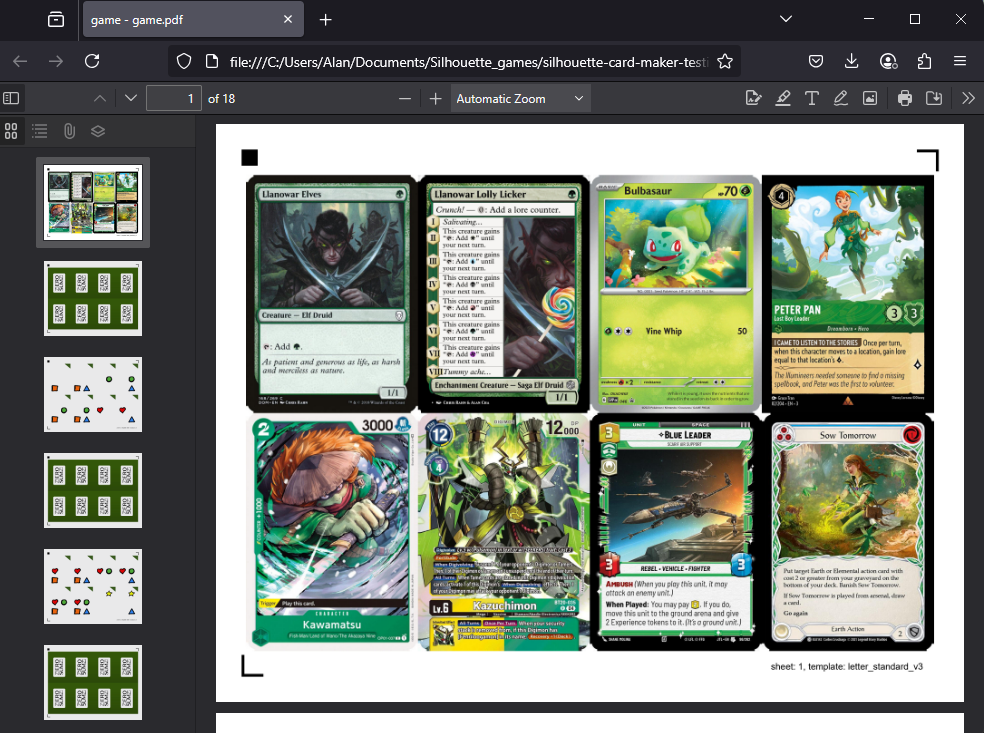
create_pdf.py is a CLI tool that layouts your card images into a PDF with registration marks that can be cut out with the appropriate cutting template in cutting_templates/.
Basic Usage
Create a Python virtual environment
python -m venv venvActivate the Python virtual environment
. venv/bin/activate.\venv\Scripts\Activate.ps1Note
You may see a security error. If you do, run the following, then try activating the environment again.
Set-ExecutionPolicy -ExecutionPolicy RemoteSigned -Scope ProcessInstall Python packages
pip install -r requirements.txtPrepare images
Put your front images in the game/front/ folder.
Put your back image in the game/back/ folder.
Run the script
python create_pdf.pypython create_pdf.py --paper_size a4Get your PDF at game/output/game.pdf.
Important
When printing the PDF with duplex printing (double-sided), use long side flip (flip on long edge) to ensure proper front and back alignment.
Plugins
Plugins streamline the process for acquiring card images for various games.
The Magic: The Gathering plugin supports various decklist formats, including Archidekt, CubeCobra, Deckstats, MPCFill, MTGA, MTGO, Moxfield, and Scryfall formats.
The Pokemon plugin supports Limitless TCG format.
The Yu-Gi-Oh! plugin supports YDK and YDKE formats.
The Altered plugin supports Ajordat format.
The Ashes Reborn plugin supports Ashes and Ashes DB formats.
The Bushiroad plugin supports Bushiroad Deck Log format for Cardfight Vanguard, Shadowverse: Evolve, Weiss Schwarz, Godzilla Card Game, and hololive.
The Digimon plugin supports Digimoncard.app, Digimoncard.dev, Digimoncard.io, DigimonMeta, Tabletop Simulator, and Untap formats.
The Echoes of Astra plugin supports AstraBuilder format.
The Elestrals plugin supports Elestrals format.
The Final Fantasy plugin supports OCTGN, Tabletop Simulator, and Untap formats.
The Flesh and Blood plugin supports Fabrary format.
The Grand Archive plugin supports Omnideck format.
The Gundam plugin supports DeckPlanet, Egman Events, ExBurst, and Limitless TCG formats.
The Lorcana plugin supports Dreamborn format.
The Netrunner plugin supports bbCode and Jinteki formats.
The One Piece plugin supports Egman Events and OPTCG Simulator formats.
The Riftbound plugin supports Piltover Archive, Pixelborn, and Tabletop Simulator formats.
The Sorcery: Contested Realm plugin supports Curiosa format.
The Star Wars Unlimited plugin supports Melee, Picklist, and SWUDB formats.
Double-Sided Cards
To create double-sided cards, put front images in the game/front/ folder and back images in the game/double_sided/ folder. The filenames (and file extensions) must match for each pair.
Corner Artifacts
If your card images have rounded corners, they they may be missing print bleed in the PDF. Because of the missing bleed, when the cards are cut, they may have a sliver of white on the corners.
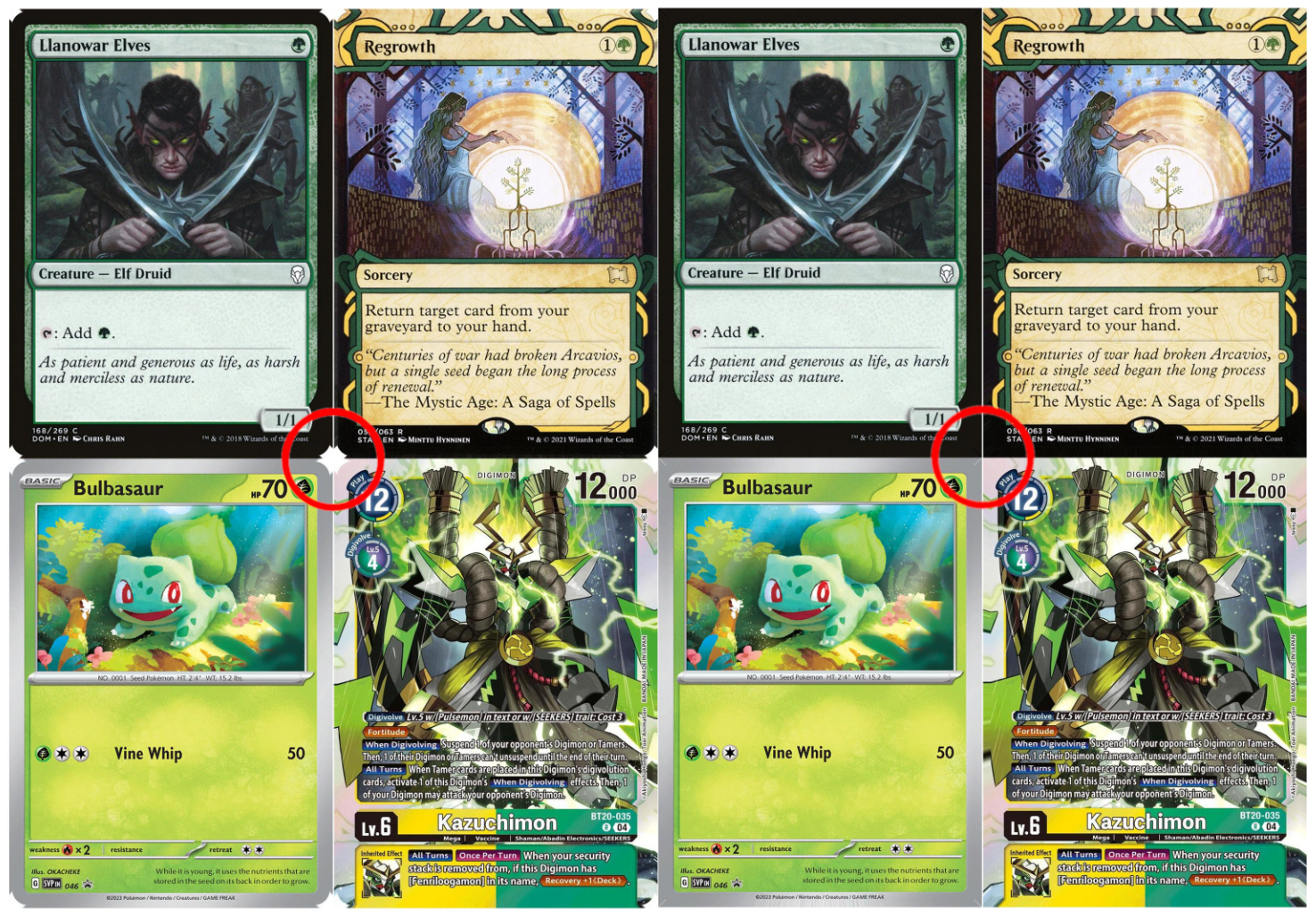
The --extend_corners option can ameliorate this issue by filling the corner regions beyond the corner radius arc with pixels sampled from the arc edge. This generates bleed that matches the rounded corners.
python create_pdf.py --extend_corners 3.5mmYou may need to experiment with the corner radius value, but 3.5mm is a good starting point for standard playing cards.
Edge Artifacts
If your print bleed does not match your card image, then there may be an issue with your your card image.
This typically occurs when there is a thin border (often 1 pixel) on one or more sides of your card image. The border is difficult to see but because the print bleed is generated from the border, the print bleed will not match the card image.
python create_pdf.py --extend_edges 3You may need to experiment with the corner radius value, but 3 (pixels) is a good starting point for standard playing cards.
Extended Outer Bleed
The distance between cards in a layout is fixed at 1.25 mm. However, extending the outer bleed of the outer cards can reduce the possibility of white edges appearing on cut cards.
The --extend_bleed option extends the bleed on the outer edges of outer cards on front pages (odd-numbered pages), while --extend_bleed_backs extends the bleed on back pages (even-numbered pages).
python create_pdf.py --extend_bleed 2mm
python create_pdf.py --extend_bleed_backs 2mm
Skip Cards
One solution for registration issues is to use a Post-It note to cover up cards near the registration marks.
However, if you would prefer to skip this manual step, you can skip the card near registration marks using the --skip option.
python create_pdf.py --skip 4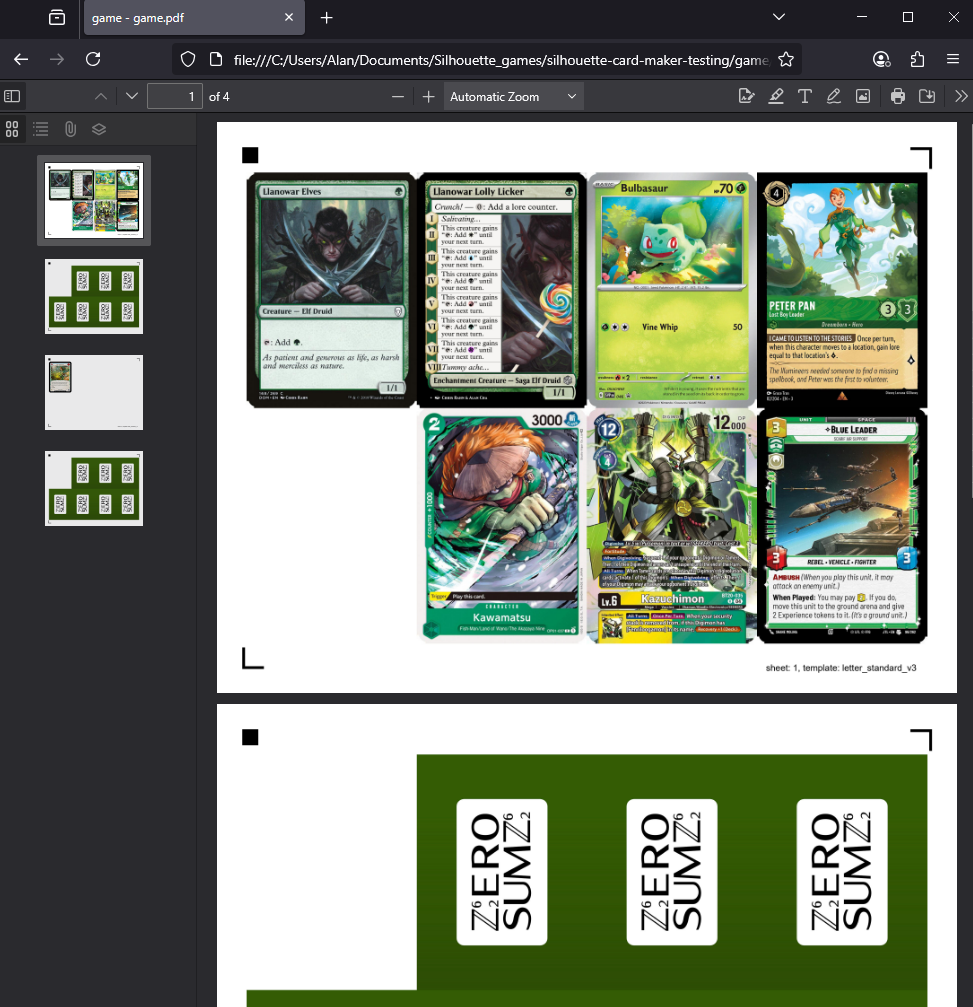
If you cut from the back, you might consider:
python create_pdf.py --skip 0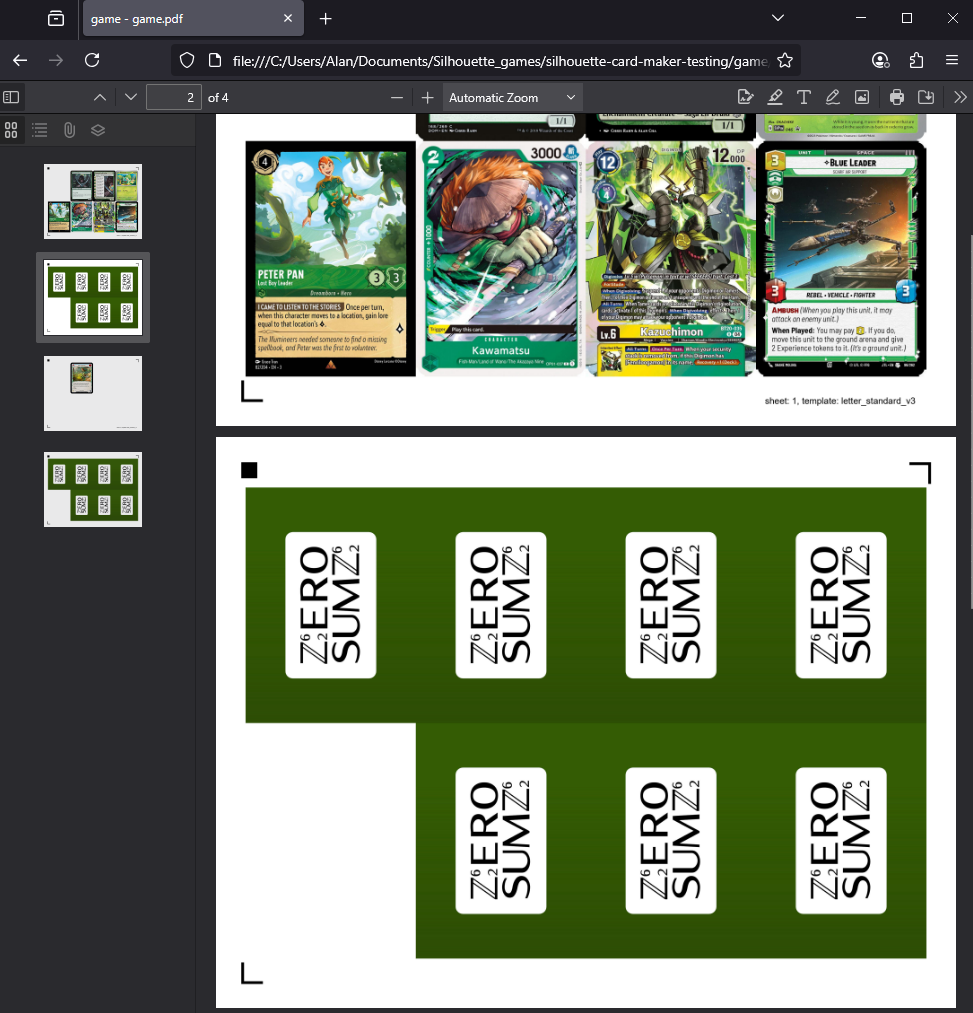
Registration Marks
create_pdf.py generates the 3-corner registration mark pattern by default.
The release of the Silhouette Cameo 5 Alpha also introduced the new 4-corner registration mark pattern.
To generate a PDF with the new 4-corner registration mark pattern, use the --registration option.
python create_pdf.py --registration 4However, Silhouette Cameo 5 Alpha users can still use the 3-corner registration mark pattern by setting machine to Cameo 5 in Silhouette Studio.
To use a different registration mark orientation than the card layout, use the --registration_orientation option. This can be useful when printing a landscape card layout on paper loaded as portrait.
python create_pdf.py --registration_orientation portraitCLI Options
Usage: create_pdf.py [OPTIONS]

Options:
  --front_dir_path TEXT           The path to the directory containing the
                                  card fronts.  [default: game/front]
  --back_dir_path TEXT            The path to the directory containing one or
                                  more card backs.  [default: game/back]
  --double_sided_dir_path TEXT    The path to the directory containing card
                                  backs for double-sided cards.  [default:
                                  game/double_sided]
  --output_path TEXT              The desired path to the output PDF.
                                  [default: game/output/game.pdf]
  --output_images                 Create images instead of a PDF.
  --card_size [standard|poker|bridge|american_mini|bridge_square|business|catan|credit|domino|domino_square|euro_business|euro_mini|euro_poker|japanese|jumbo|micro|mini|mini_american|mini_euro|photo|standard_double|tarot|70mm_square]
                                  The desired card size.  [default: standard]
  --paper_size [letter|legal|tabloid|a4|a3|arch_b|ansi_a|ansi_b]
                                  The desired paper size.  [default: letter]
  --registration [3|4]            The desired registration pattern.  [default:
                                  3]
  --registration_orientation [portrait|landscape]
                                  Override the registration mark orientation
                                  without changing the card layout.
  --specialty [a4-commander|letter-commander]
                                  Use a specialty layout. Overrides card_size,
                                  paper_size, and registration settings.
  --only_fronts                   Only generate front pages.
  --fit [stretch|crop]            How to fit front and double-sided images to
                                  card size. 'stretch' allows distortion,
                                  'crop' preserves aspect ratio by center-
                                  cropping.  [default: stretch]
  --fit_backs [stretch|crop]      How to fit back images to card size.
                                  'stretch' allows distortion, 'crop'
                                  preserves aspect ratio by center-cropping.
  --crop TEXT                     Crop card edges of front and double-sided
                                  images (removes edges). Examples: 3mm,
                                  0.125in, 6.5.
  --crop_backs TEXT               Crop card edges of back images (removes
                                  edges). Examples: 3mm, 0.125in, 6.5.
  --extend_edges TEXT             Crop card edges and extend them for front
                                  and double-sided images. Examples: 3mm,
                                  0.125in.
  --extend_edges_backs TEXT       Crop card edges and extend them for back
                                  images only. Examples: 3mm, 0.125in.
  --extend_corners TEXT           Extend rounded corner regions to reduce
                                  corner artifacts for front and double-sided
                                  images. Examples: 3mm, 0.125in.
  --extend_corners_backs TEXT     Extend rounded corner regions to reduce
                                  corner artifacts for back images only.
                                  Examples: 3mm, 0.125in.
  --extend_bleed TEXT             Extend the outer bleed of outer cards on
                                  front pages (odd-numbered pages). Examples:
                                  3mm, 0.125in.
  --extend_bleed_backs TEXT       Extend the outer bleed of outer cards on
                                  back pages (even-numbered pages). Examples:
                                  3mm, 0.125in.
  --ppi INTEGER RANGE             Pixels per inch (PPI) when creating PDF.
                                  [default: 300; x>=0]
  --quality INTEGER RANGE         File compression quality.  [default: 100;
                                  0<=x<=100]
  --load_offset                   Apply saved offsets. See `offset_pdf.py` for
                                  more information.
  --skip INTEGER RANGE            Skip a card based on its index. Useful for
                                  registration issues. Examples: 0, 4.  [x>=0]
  --label TEXT                    Apply a custom label to each page.
  --show_outline                  Show a white outline for cutting paths.
  --borderless                    Use tighter inset to fit more cards per
                                  page.
  --version                       Show the version and exit.
  --help                          Show this message and exit.
Examples
Create poker-sized cards with A4 sized paper.
python create_pdf.py --card_size poker --paper_size a4Crop the borders of the front and double-sided images by 3 mm on all sides. This option is useful if your images already have print bleed like those from MPCFill.
python create_pdf.py --crop 3mmRemove the rounded corner artifacts and load the saved offset from offset_pdf.py.
python create_pdf.py --extend_corners 3.5mm --load_offsetProduce a 600 pixels per inch (PPI) file with minimal compression.
python create_pdf.py --ppi 600 --quality 100